Roomful Games › TV games with phones
Games to play on your TV with phones, no console needed
You don't need a game console to play games on the TV. Open a game in a browser on the TV or a laptop, and everyone uses their own phone as the controller. Here's how it works, and seven free games to try.
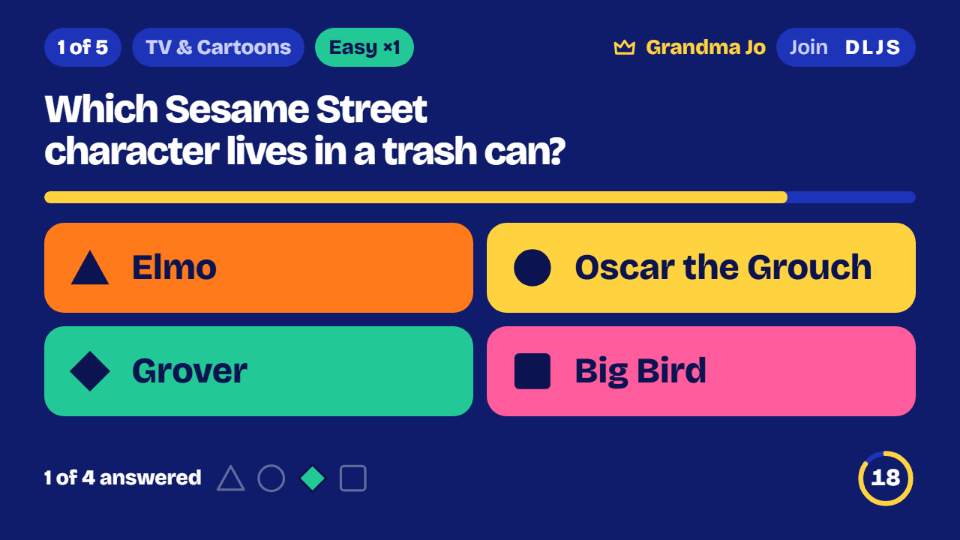
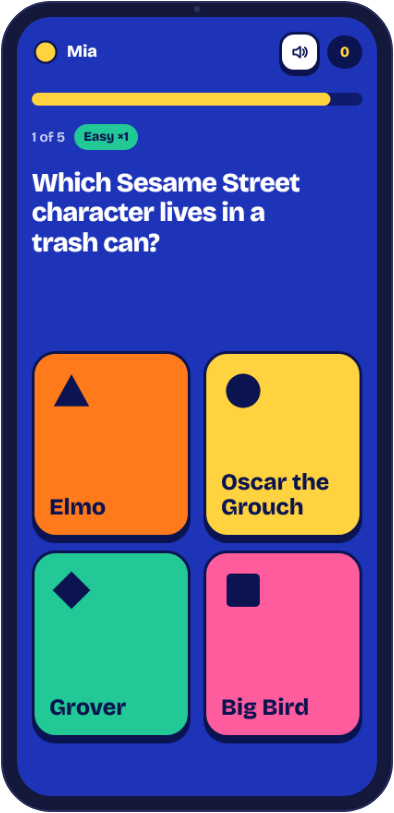
How it works
- Open a game on the big screen: a smart TV's web browser, or a laptop, phone or tablet connected to the TV.
- The TV shows a four-letter code and a QR code.
- Everyone joins on their phone's web browser with the code and a nickname. No app and no account.
Your phone never talks to the TV directly. Both of them talk to our game over the internet, which is why one person can be on the home wifi, another on mobile data, and a third in a different town.
Seven free games
- Roomful Trivia: four kinds of trivia in 48 categories, solo or in teams. Up to 12 players, or 12 teams and 20 phones. Ten questions of Buzz-in take about five minutes.
- Roomful Bingo: picture and number bingo, a different card on every phone. Up to 12 phones, and printed cards can join the same game.
- Roomful Charades: the word shows only on the actor's phone. From 3 to 12 phones, with 30, 60 or 90 seconds a turn.
- Roomful Cards: Crazy 8s, Go Fish, Hearts, Spades, Blackjack and poker, each hand private on its own phone. Chips are just for fun and have no value.
- Roomful Words: a race to spell the word as its letters appear. Up to 30 phones, in games of 10, 15 or 20 words.
- Roomful Mystery: a whodunit party with a secret character on every phone. From 3 to 12 players, about 40 minutes.
- Roomful Escape: an escape room where every phone holds different clues. Missions run from 20 to 75 minutes.
Getting the game on the TV
An HDMI cable works with any TV. AirPlay, Google Cast and screen mirroring work without a cable. With Roomful Trivia, a smart TV's own browser needs nothing at all: choose Phones + a TV on the host's phone, open roomfulgames.com/trivia/tv on the TV and type the code. Roomful Escape does the same at roomfulgames.com/escape/tv, and Roomful Cards has its own TV table at roomfulgames.com/cards/tv. Play on your TV has a two-minute video and the steps for each way.
| Way to connect | Best when | Worth knowing |
|---|---|---|
| HDMI cable | You have a laptop and any TV with an HDMI port | Windows: press Windows + P and choose Duplicate. Mac: set the TV to Mirror in Displays. Phones need a USB-C or Lightning adapter. |
| AirPlay | You have an iPhone, iPad or Mac, and an Apple TV or a compatible Samsung, LG, Vizio, Sony or Roku TV | Both have to be on the same wifi. If the TV shows a code, type it on your device. |
| Google Cast | You have Chrome or Android, and a Chromecast, Google TV or a TV with Cast built in | In Chrome, casting a tab also sends the game's sound. |
| Screen mirroring | You have a Samsung Galaxy, Roku, Fire TV or Windows PC | Samsung uses Smart View, Fire TV has Mirroring under the Home button, and Windows uses Windows + K. |
Different crowds, different first games
If the group is four or five adults, start with Bluff inside Roomful Trivia, where you write fake answers and try to fool each other. If it's six cousins aged 7 to 14, Roomful Words levels the field, since a head start shows the first letters and a wrong guess costs nothing. For grandparents and young children, Roomful Bingo lets the game mark the squares for small players, and sets like Animal Bingo have a picture on every square.
For friends who are not in the same room, Roomful Cards works across town or across the country with just a code, and someone with a video call running can share any other game's screen. For a big group of up to 30, Words and the Lost Sleigh escape room are the two that fit everyone on their own phone.
A first try, in 20 minutes
If you've never done this before, here's a way to test the whole idea in the time it takes to warm up leftovers.
- Minutes 0 to 5. Pick the way of connecting from the table above, and get a laptop or phone showing on the TV. Turn on Do Not Disturb first, so messages don't pop up in front of everyone.
- Minutes 5 to 7. Open Roomful Bingo and choose Host a game, with Foods We Love, any line, and a call every 12 seconds. Everyone goes to the address on the TV, or scans the QR code.
- Minutes 7 to 17. Play one game, about ten minutes. Tick Read each call aloud if you want the TV to speak.
- Minutes 17 to 20. Open today's puzzles and try Guess the Number together on one phone, then decide what you'd like to play next time.
What goes on the shopping list (nothing, mostly)
- A TV, or any big screen, and something to put on it: a laptop, a phone or the TV's own web browser.
- A phone or tablet per player with any web browser, iPhone or Android. Sharing is fine for small children.
- An HDMI cable or adapter, only if you don't have AirPlay, Cast or mirroring.
- No console, no controllers, no app and no sign-up.
When the TV won't cooperate
- The TV says No Signal. Press Input or Source on the remote and pick the HDMI port the cable is in.
- AirPlay can't find the TV. Check that the device and the TV are on the same wifi. Menus look a little different from one model to the next.
- The picture is choppy. Move closer to the wifi router, or use a cable. Phones are not affected by the TV's connection, so the game keeps its pace.
- There's no sound. Check the TV's volume, then click once on the game's page, since browsers stay silent until someone taps. On a laptop with HDMI, set the laptop's sound output to the TV. Bingo and Words only read aloud when you tick that option during setup.
- A phone can't get in. Make sure it's on the same game as the TV, because a code belongs to one game. At roomfulgames.com/join the code finds the right game by itself. If the game is full, two people can share a phone.
- Someone turned up after the start. The code stays on the TV. Most games let them join straight away; at the card table they watch until the next hand.
Questions
- Do I need a smart TV?
- No. Any TV with an HDMI port works with a laptop, and many TVs take AirPlay or Google Cast.
- Which phones work?
- Any phone or tablet with a web browser, iPhone or Android. Nothing to install.
- How many can play?
- Most games take up to 12 phones. Roomful Trivia can take up to 12 teams and 20 phones, and Roomful Words and Roomful Escape take up to 30 phones.
- Can I play alone if nobody else is around?
- Yes. Try today's puzzles, Solitaire, Guess the Clues or trivia solo. Every card game also runs against computer players.