Roomful Games › Kahoot alternative
A free Kahoot alternative for the classroom
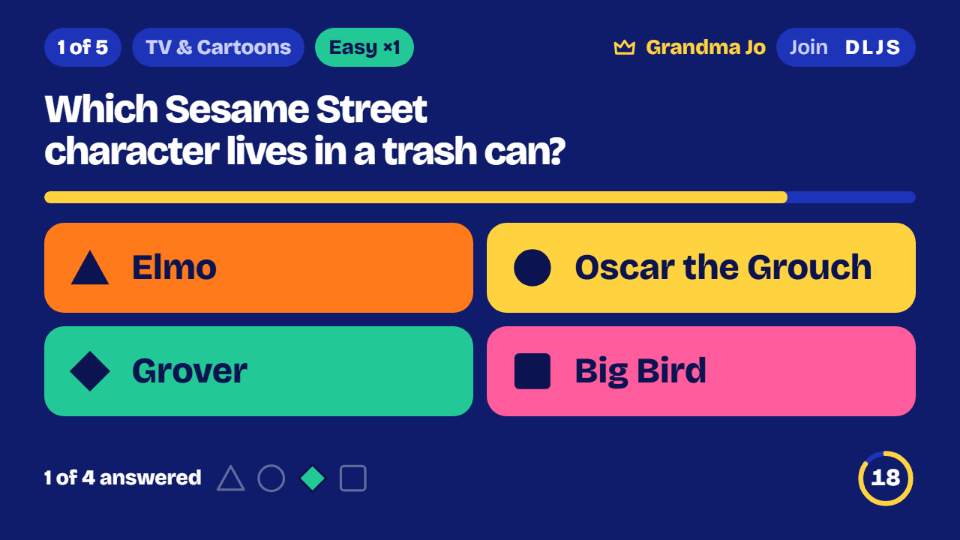
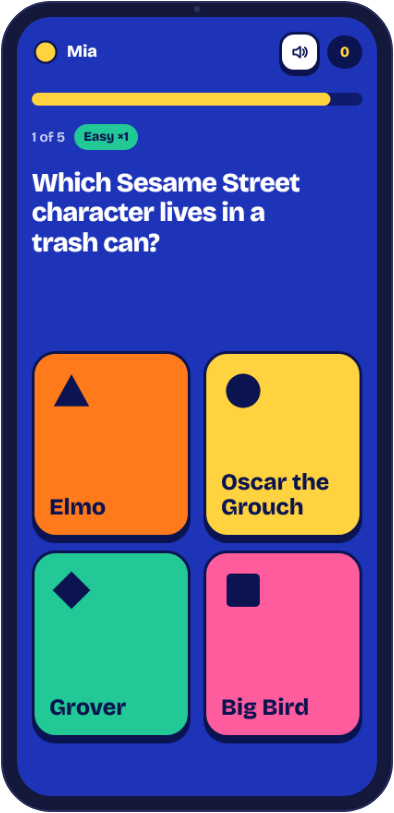
Looking for a quick, free quiz game for your classroom screen? Roomful Trivia puts the questions on the board and lets students answer on phones or tablets, in teams, or all together with no devices at all. Nobody needs an account, the teacher included.
How it compares
Kahoot is built for quizzes you write yourself, with reports on every student's answers. Its free plan limits how many players can join and keeps many features for paid plans. Roomful Trivia is different: the questions are ready-made, the whole thing is free, and there is nothing to sign up for.
| Roomful Trivia | Kahoot | |
|---|---|---|
| Price | Free | Free plan with limits, paid plans for more |
| Accounts | None, for anyone | The teacher signs in; students join with a PIN |
| Questions | Ready-made, 48 categories | Write your own, or use shared quizzes |
| Without student devices | Yes: play together on one screen | Built for a device per student or team |
| Student reports | No | Yes |
When Roomful Trivia fits best
- A warm-up, a reward or a brain break when you don't have time to write a quiz.
- Classes where students don't have devices: choose Together on this screen, the class calls out its answers, and you click the one it agrees on.
- Big classes: play in teams. A game takes up to 12 teams, up to 4 phones on a team and 20 phones in the room, so one phone per table works well.
- Spelling: Roomful Words takes up to 30 phones, with sight words and grade 2 and grade 3 spelling lists.
When Kahoot fits better
If you want to quiz students on your own lesson, or need a record of who answered what, Kahoot is made for that and Roomful Trivia isn't. Many teachers use both: their own quiz for review, a Roomful game for fun.
Kahoot is a trademark of Kahoot! ASA. Roomful Games has no connection with it; this comparison was written in November 2026 from Kahoot's plans page, which has its current plans and limits.
Matching the game to the room
Quiz games only work when the setup matches the class in front of you. These are the choices we would make for a few common rooms.
- Grade 1 or 2, no devices. Skip the timer pressure. Use Roomful Words with a sight words set in the classroom setting with no phones. Split the class into teams and tap whichever team calls the word first. The first letters show from the start.
- Grades 3 and 4, one tablet per table. Trivia with Teams on phones, Easier questions and the Relaxed pace, which gives 30 seconds a question. Six tables make six teams, and the tablet can move around the table each round.
- Grades 5 to 8, a device each. A class of up to 30 can join one game of Roomful Words. For trivia, use teams, since a teams game holds 20 phones in all. With 28 students, let pairs or threes share a device.
- High school, ten spare minutes. Trivia on the Harder setting with world history, U.S. history or science. Harder questions are worth more points, so every round counts.
A 40-minute class, sketched out
Here's how a review-and-reward period could run. It keeps your own quiz for the graded part and uses Roomful for the last stretch.
- Minutes 0 to 5: read three or four questions aloud from a topic page, such as geography. Each page has thirty questions with answers, and they are different from the ones in the game, so nothing gets spoiled.
- Minutes 5 to 25: your own lesson, or your own review quiz in whatever tool you like.
- Minutes 25 to 28: open Roomful Trivia on the board and choose Host a game. Pick the categories, ten questions and the difficulty. Students at each table scan the QR code or type the four letters.
- Minutes 28 to 36: play. Ten Buzz-in questions take about five minutes at the Normal pace, or closer to seven at Relaxed, so you can stop and talk about a surprising answer. The host can pause at any time.
- Minutes 36 to 40: read out the final scores, then let the class try one of today's puzzles together, such as Trivia 5 or Country Shape, as they pack up.
Bring to the classroom
- A screen or board the class can see, with a web browser. A laptop on a projector is fine.
- One device per table if you want teams, or none at all for Together on this screen.
- A few minutes before class to pick categories. Nothing needs an account, a class code or a roster.
Common classroom snags
- A device can't reach the page. Some school networks filter new sites. Try it on the classroom computer first and, if it's blocked, send your IT team this page.
- The code doesn't work. Have students look again at the board: the four letters are easy to mix up from the back row. Scanning the QR code avoids typing altogether.
- Two students pick the same nickname. The second gets a message asking for another. Nicknames go through a word filter, so a rude one won't get in.
- A student comes back from the nurse. They can join with the code during the game and pick a team, as long as you haven't locked the room and the team has fewer than four phones.
- The projector has no sound. The game plays without it. The speaker button, or the M key, turns sounds on and off on that screen.
- You don't want names on the public board. Scores above zero go on the high-score boards with the nickname. Students can tick the box to stay off the board when they join.
Questions
- Do students need an account or an app?
- No. They open roomfulgames.com/trivia in a browser and type the four-letter code on the board.
- Can I add my own questions?
- Not yet. Roomful Trivia's questions are checked by hand, in categories from science and geography to history and words. If your lesson needs its own questions, a quiz tool you write yourself is the better fit.
- Is there anything for young readers?
- Yes. Choose Easier questions and the Relaxed pace, or play Roomful Bingo with pictures, where the game can mark called squares for young children.
- Can students play from home?
- Yes. Share the game's screen on a video call, and students join with the code on their own devices. Students on a phone with no shared screen can use Host on this device, where everyone plays on their own phone wherever they are.