Roomful Games › Classroom trivia
A free classroom trivia game for your smartboard
Roomful Trivia turns the classroom screen into a quiz show: the board shows the question, and students answer on phones or tablets, or call it out together. It's free, it runs in a browser, and nobody needs an account.
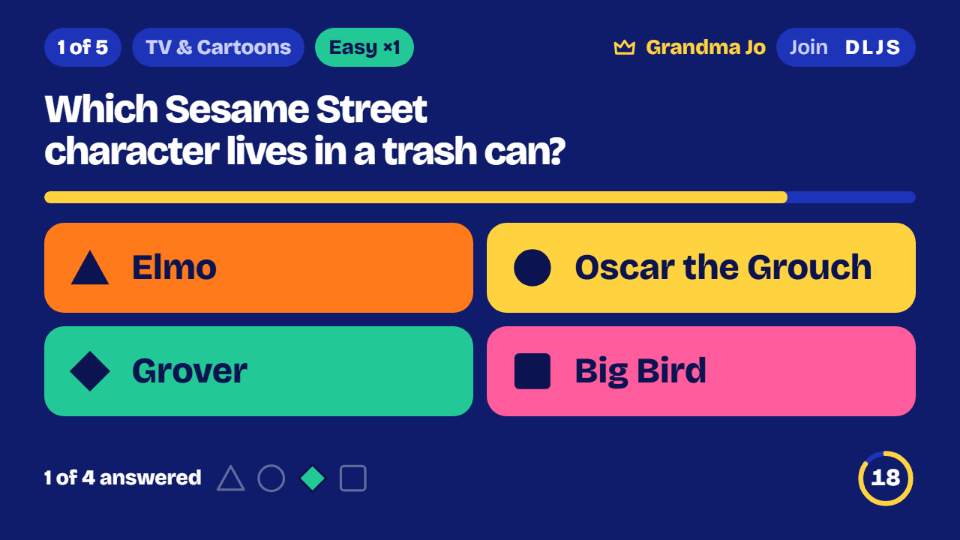
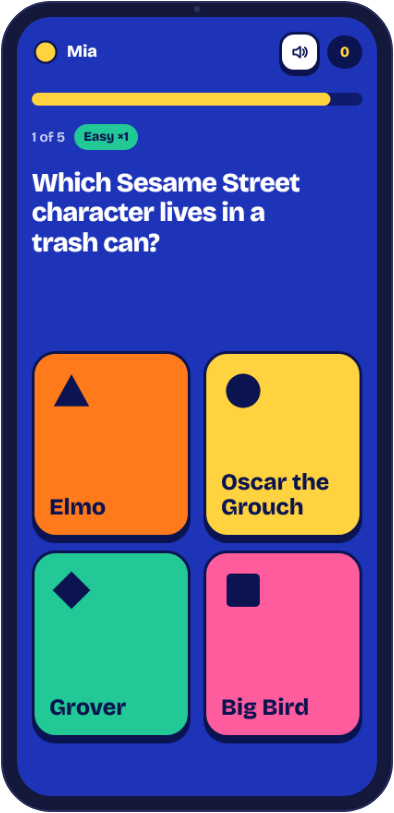
Set it up in a minute
- On the classroom computer, open Roomful Trivia and choose Host a game.
- Pick the categories, how many questions (5, 10 or 15), the difficulty and how fast the timer runs.
- Choose how the class plays: Teams on phones (phones or tablets), or Together on this screen with no devices.
- Students join by scanning the QR code or typing the four-letter code, then you start the game.
Categories that fit the curriculum
There are 48 categories, all checked by hand, each with easier and harder questions. A few that sit naturally beside school subjects:
- Science units: science, space, the human body, animals and dinosaurs.
- Social studies: geography, U.S. history and world history.
- Language arts: words and language and fairy tales, plus Roomful Words for spelling.
- A Friday afternoon: food, holidays around the world and the lighter categories.
Faith and Religion and the For Grown-Ups categories start switched off, so they only appear if you choose them on purpose. Each topic in the full list also has a page of thirty questions with answers that you can read aloud.
Pick the setup for your class
| Your class | Mode | Settings to try |
|---|---|---|
| 22 third graders, no devices | Together on this screen | Easier, Relaxed, 5 questions. Pick a different student to click the answer each round, or press 1 to 4 on the keyboard yourself. |
| 28 fifth graders, one tablet per table | Teams on phones | Mixed, Normal, 10 questions. Seven tables make seven teams, well under the limit of 12. |
| 18 seventh graders with their own devices | Teams on phones | Mixed, Normal, 15 questions. Teams of up to four phones, 20 phones in all. Anyone on a team can pick and lock in. |
| 12 or fewer in a small group or club | Everyone on their own phone | Each student is a player, with no teams at all. Try Closest Guess for a change: every answer is a number. |
| A high school class with ten minutes to fill | Teams on phones | Harder, Quick, 10 questions. Harder questions are worth up to twice the points in Buzz-in Trivia and Closest Guess. |
Bluff, where students write fake answers, is the one to save for older students who can type quickly and enjoy being sly. Played together on one screen, Bluff has no writing: the class just picks the real answer from the truth and a few fakes.
A 45-minute period that ends with a game
Here's one way to use a period when you've finished a unit on the solar system a little early.
| When | What happens |
|---|---|
| 0 to 10 minutes | Finish the lesson. Open space questions on the board and read three of them as a warm-up, then close the page. |
| 10 to 13 minutes | Open Roomful Trivia, choose Space and Science, 10 questions, Mixed, Normal. Move students to their table groups, and each table picks a team name. |
| 13 to 15 minutes | Tables scan the QR code and form teams. The board shows who is in, so you can see which table is missing. |
| 15 to 21 minutes | Play. Ten Buzz-in questions take about five minutes, and you can pause at any time to talk about a question. Pause on purpose once, after the one most tables got wrong. |
| 21 to 26 minutes | Look at the final scores together. Ask each table to explain one answer that surprised them. |
| 26 to 40 minutes | Back to work: short written reflection, or a second game of 5 questions on Harder for early finishers. |
| 40 to 45 minutes | A last puzzle for the whole room from today's dailies, such as Guess the Number, then pack up. |
Tips from the classroom
- Teams for a big class: up to 12 teams with up to 4 phones each. One device per table keeps everyone talking.
- No devices? Choose Together on this screen: the class plays as one team, and a different student can click the answer each round.
- A five-minute warm-up: five easy questions at the start of class. A slower timer helps younger readers.
- Before the game: our free question pages have different questions with answers to read aloud, so nothing in the game is spoiled.
On the day: what you'll want
- A computer connected to the smartboard or projector, with a web browser.
- Student phones, tablets or school laptops if you are playing in teams, one per table at minimum.
- A list of table groups, if you'd like to pick teams yourself.
If the bell is close and something breaks
- A tablet won't join. Check it's on the trivia page and that the code is typed exactly. A school network that filters new sites may need roomfulgames.com allowed, which is worth testing the day before.
- Everything is blocked or slow. Switch to Together on this screen, which needs only the one computer, or read aloud from a topic page.
- The board is silent. The questions are on screen, so the game works fine without sound. To hear the sound effects, check that the board's volume is up and click once on the page.
- Someone joins late. A latecomer can join with the code and start from the next question, unless you've locked the room.
- A smartboard tap doesn't register. Click answers from the classroom computer instead, or press 1 to 4 on the keyboard.
Questions
- Does it work on a smartboard or projector?
- Yes. Anything with a web browser that the class can see works. The questions and scores are big enough to read from the back of the room.
- Can I use my own questions?
- Not yet. The questions are ours, in many school subjects. For your own lesson's review, a quiz tool where you write the questions is a better fit.
- Is it safe for students?
- There are no accounts, chats or photos. Nicknames go through a word filter, and a room keeps only nicknames and scores, for a few hours.
- How long does a game take?
- Ten Buzz-in questions take about five minutes at the Normal pace and about seven at Relaxed. With 5 questions you can fit a game into a transition.